
Notch Boy brings your Codex and OpenCode tasks to the MacBook notch. Stay on top of what needs attention and track your weekly allowance, local totals。
Notch Boy is a native macOS utility that puts the status of your local Codex tasks in your Mac’s notch.
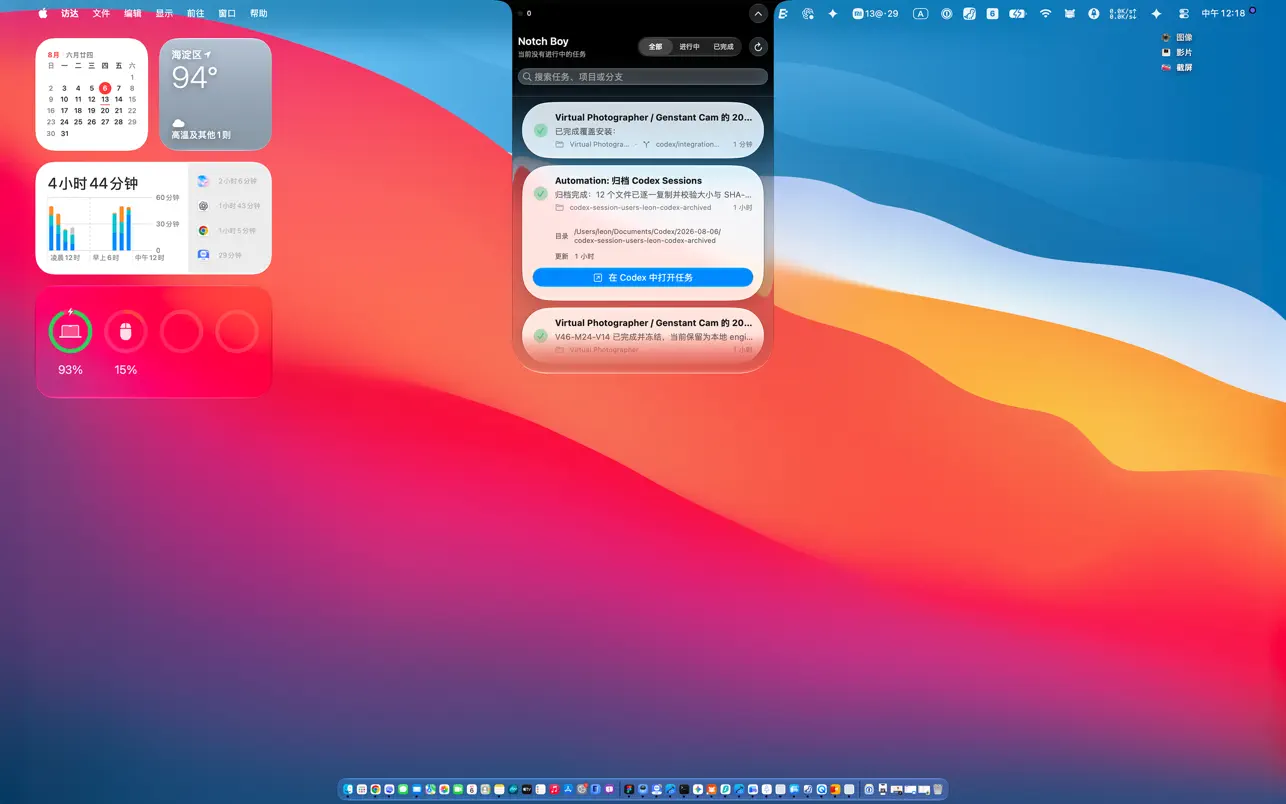
Click the status island at the top of the screen to open the task list. See each task’s title, project, Git branch, latest progress, and update time without switching windows.
Key features
- Keep Codex task status visible at the top of your screen
- See inferred stages including In Progress, Implementing, Verifying, Awaiting Confirmation, and Completed
- Expand a task to view its project, branch, progress summary, and update time
- Return to the matching Codex task through a local deep link
- Search tasks, filter by status, and use an adaptively sized task list
- Use a centered status island automatically on Macs without a notch
- Explore the complete interface with built-in demo data
Privacy first
Notch Boy does not access any data by default. It reads the task database and rollout logs only after you explicitly authorize a .codex folder through the macOS system picker. Access is read-only, and all processing stays on your Mac. No account is required. Task content is never uploaded, and the app contains no advertising, analytics, or third-party tracking SDKs. You can revoke folder access at any time.
The Mac App Store version receives updates through the App Store.
About Notch Boy
Notch Boy is an independently developed local companion. It is not affiliated with or endorsed by OpenAI. Task stages are inferred from local events and summaries and may differ from unpublished internal Codex states.