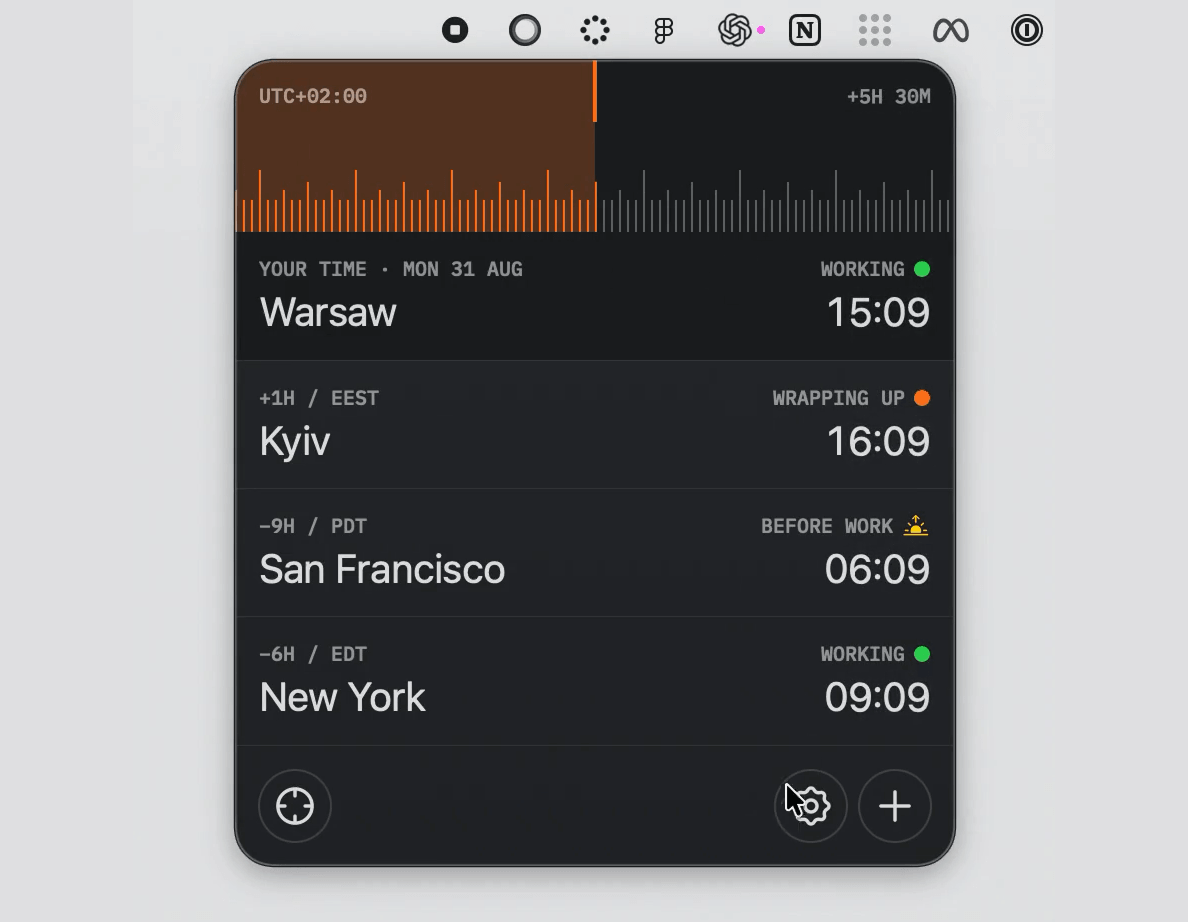
Timezones keeps your clients, teammates, and cities aligned around the same instant. Drag one tactile timeline and every tracked timezone moves with it—complete with daylight-saving changes, fractional offsets, working-hour context, and an optional quiet dial sound.
Highlights
- Lives entirely in the macOS menu bar
- Compares every saved city against one shared timeline
- Uses canonical timezone data, including DST and fractional offsets
- Shows working, wrapping-up, night, and weekend context at a glance
- Supports direct row reordering and contextual city actions
- Includes light, dark, and system appearance modes
- Offers keyboard and trackpad-friendly timeline control
- Stores preferences locally and makes no network requests
Requirements
- macOS 14 Sonoma or newer
Build from source
git clone https://github.com/taras-creates-things/Timezones.git
cd Timezones
open Timezones.xcodeproj
In Xcode, select the Timezones scheme and My Mac, then press Run. The app is menu-bar-only, so it will not appear in the Dock.
Using the timeline
- Drag the ruler or scroll horizontally over it to shift every city together.
- The orange range measures the distance between now and the selected time.
- Click the target button to animate smoothly back to the current time.
- After focusing the ruler, use Left/Right Arrow to move by 15 minutes; hold Shift to move by one hour.
- Use the plus button to add a city and the settings button to adjust appearance, time format, home timezone, launch behavior, and sound.
- Drag city rows to reorder them, or secondary-click a row to copy, edit, move, or remove it.
Privacy
All timezone calculations and preferences stay on your Mac. Timezones has no account system, analytics, advertising, or network service.