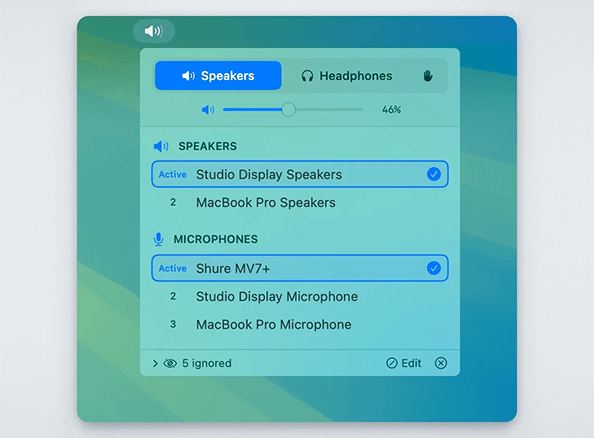
A native macOS menu bar app that automatically manages audio device priorities. Set your preferred order for speakers, headphones, and microphones - the app automatically switches to the highest-priority connected device.
Features
- Priority-based auto-switching: Devices are ranked by priority. When a higher-priority device connects, it automatically becomes active.
- Separate speaker/headphone modes: Output devices are categorized as either speakers or headphones, each with their own priority list.
- Manual override: Enable "Custom" mode (hand icon) to disable auto-switching and select devices freely.
- Device memory: Remembers all devices you've ever connected, even when disconnected. Edit mode shows disconnected devices with "last seen" timestamps.
- Per-category ignore: Hide devices from specific categories without affecting others.
- Drag-to-reorder: Reorder devices by dragging or using up/down arrows.
- Volume control: Adjust volume with slider or scroll wheel.
- Menu bar integration: Shows current mode icon and volume percentage.
Usage
Modes
| Mode | Icon | Behavior |
|---|---|---|
| Speakers | 🔊 | Shows speaker devices, auto-switches to highest priority |
| Headphones | 🎧 | Shows headphone devices, auto-switches to highest priority |
| Custom | ✋ | Shows all devices, no auto-switching |
Managing Priorities
- Click a device: Moves it to #1 priority (in normal mode) or just selects it (in custom mode)
- Drag devices: Reorder by dragging the handle
- Up/Down arrows: Fine-tune order on hover
Device Actions (hover menu)
- Move to Speakers/Headphones: Change device category
- Ignore as [category]: Hide from current category only
- Ignore entirely: Hide from both speaker and headphone lists
- Forget Device: Remove disconnected device from memory
Edit Mode
Click "Edit" in the footer to:
- See all devices ever connected (disconnected ones grayed out)
- Reorder disconnected devices in the priority list
- View "last seen" timestamps
- Forget old devices you no longer use
How It Works
- Device Discovery: Uses CoreAudio to enumerate audio devices and listen for changes.
- Priority Storage: Device priorities are stored in UserDefaults, keyed by device UID (stable across reconnects).
- Auto-Switching: When devices connect/disconnect, the app automatically selects the highest-priority available device for the current mode.
- Categories: Each output device is assigned to either "speaker" or "headphone" category, with separate priority lists.