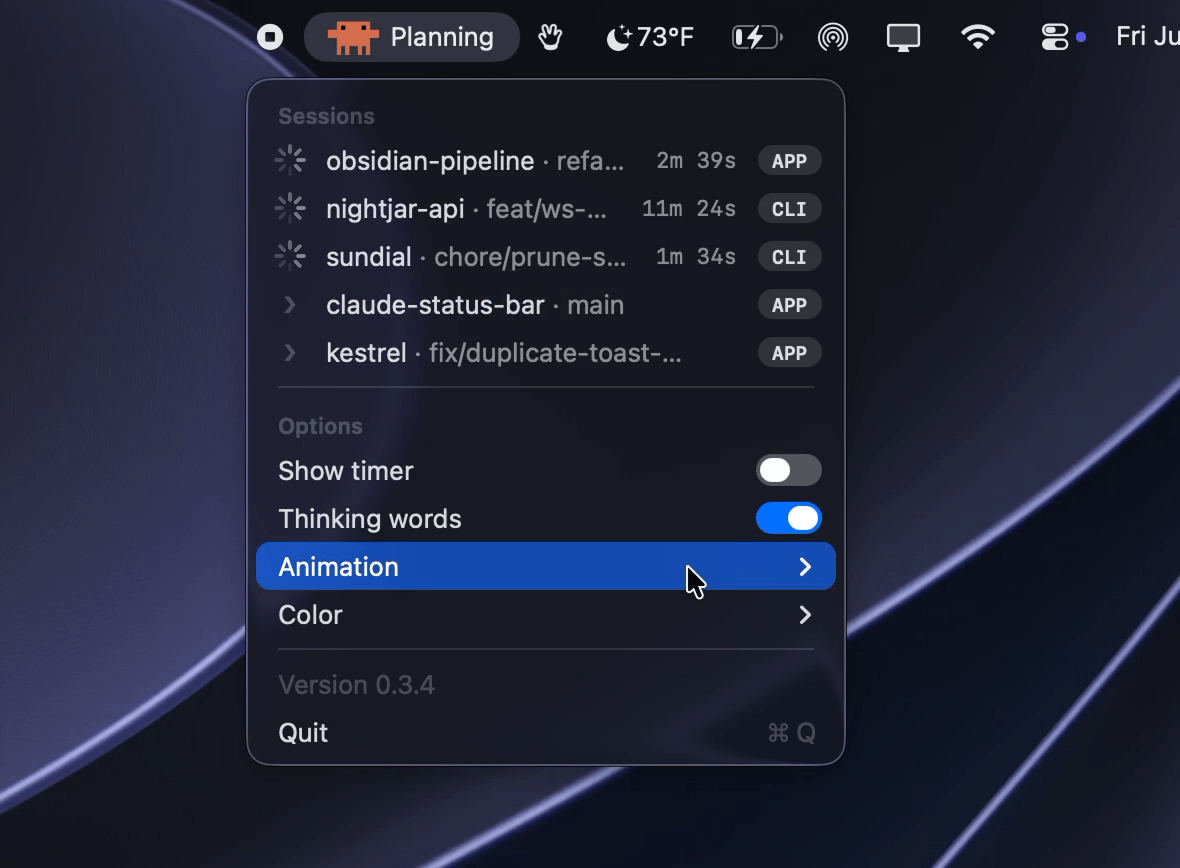
A lightweight macOS menu bar utility that surfaces Claude Code's real-time activity without ever opening a window or taking up Dock space. It launches automatically when a Claude Code session starts and quits when nothing is running, so there's nothing to manage.
What it shows
- Thinking / working — an animated Claude icon with a live elapsed-time timer.
- Running a tool — a short label such as "Editing," "Reading," or "Running command."
- Awaiting permission — a paused yellow dot when Claude needs your approval.
- Idle / done — rests on the Claude logo.
Menu options
- Toggle the elapsed-time timer.
- Rotate playful "thinking" verbs (e.g., "Manifesting…," "Percolating…").
- Choose an animation style: Claude Spark (web/chat morph), Claude Code (terminal glyph spinner), or Crab Walking (pixel-art Clawd crab).
- Set the icon color to Orange or System (adaptive black/white).
Where it works
| Surface | Supported |
|---|---|
| Claude Code CLI (terminal) | ✅ |
| Claude Code Desktop — Code tab | ✅ |
| Cursor (Claude Code extension) | ✅ |
| Claude Desktop — Chat/Cowork tab | ❌ |
Multi-session support: when several Claude Code sessions run at once, the menu bar surfaces the highest-priority one — a session awaiting your permission is never hidden behind one that's thinking.
Install
Homebrew (recommended)
brew install --cask claude-status-bar && open -a "Claude Status Bar"
DMG Download the latest signed and notarized release from GitHub Releases, drag "Claude Status Bar" into Applications, and launch it once to wire up the hooks automatically.
Requirements
- macOS 12+
- Claude Code (CLI or Desktop app)
- Node.js