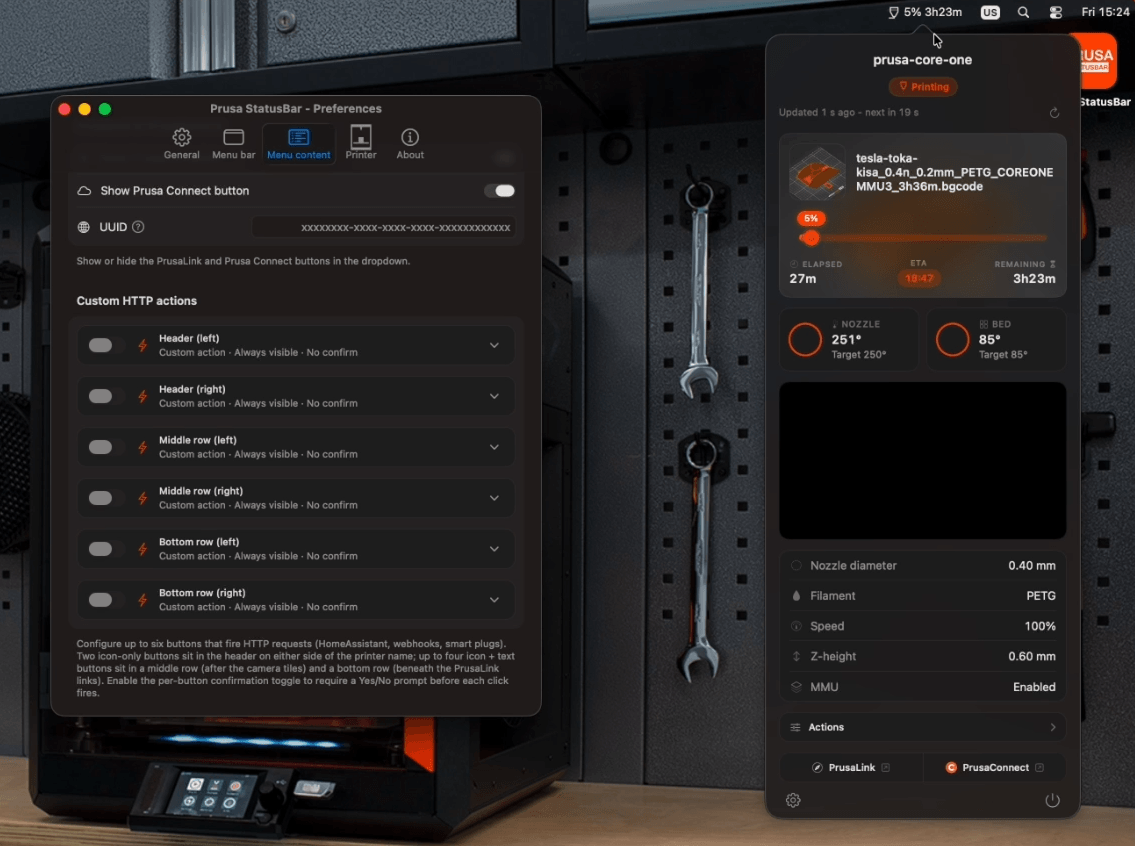
Prusa StatusBar is a native macOS menu bar application that lets you monitor your Prusa 3D printer directly from the menu bar.
Key Features
- Live State Monitoring: See your printer's current state (idle, printing, paused, finished, etc.) at a glance with distinct icons and colors for each state
- Progress & Time: View print progress percentage and remaining time right in the menu bar next to the clock
- Detailed Job Information: Access thumbnail previews, elapsed time, remaining time, and ETA from the dropdown menu
- Temperature Monitoring: Track nozzle and bed temperatures with visual ring gauges showing current vs target values
- Job Controls: Pause, resume, or stop prints directly from the menu bar without opening a browser
- Custom Actions: Add your own HTTP action buttons to integrate with Home Assistant, smart plugs, or custom scripts
- Camera Support: View live RTSP streams from Prusa Buddy cameras or generic HTTP/HTTPS camera feeds
- Smart Notifications: Get native macOS notifications when prints start, finish, or need attention, with embedded camera snapshots
- Dual Connection Support: Configure primary and fallback printer URLs for seamless Wi-Fi/Ethernet switching
- Privacy First: API keys stored in system Keychain, App Sandbox enabled, no telemetry
Installation
Install via Homebrew:
brew install --cask deimosfr/tap/prusa-statusbar
Or download the latest DMG from the Releases page.
Requirements
- macOS 14+
- Prusa printer with PrusaLink support
Languages
Available in 10 languages: English, Czech, German, Spanish, French, Italian, Japanese, Polish, Brazilian Portuguese, and Simplified Chinese.