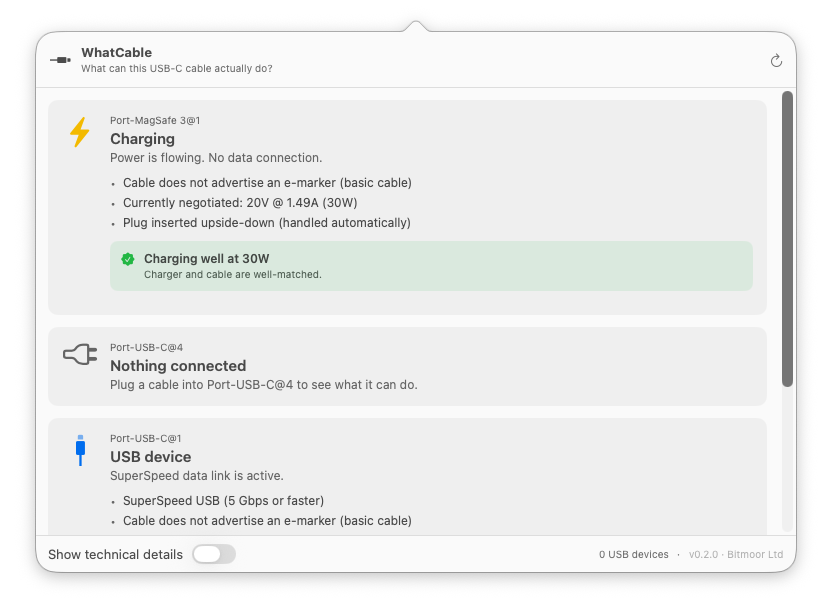
WhatCable is a small macOS menu bar app that tells you, in plain English, what each USB-C cable plugged into your Mac can actually do, and why your Mac might be charging slowly.
USB-C hides a lot under one connector. Anything from a USB 2.0 charge-only cable to a 240W / 40 Gbps Thunderbolt 4 cable, all looking identical in your drawer. macOS already exposes the relevant info via IOKit; WhatCable surfaces it as a friendly menu bar popover.
What it shows
Per port, in plain English:
- At-a-glance headline: Thunderbolt / USB4, USB device, Charging only, Slow USB / charge-only cable, Nothing connected
- Power delivery: Wattage the cable can carry and actual charging wattage (if charging)
- Data capabilities: USB version, speed tier, and alternate modes (DisplayPort, Thunderbolt)
- Charging diagnostics: Detects slow-charge scenarios and explains why (e.g., "Your charger is 100W but this cable only supports 60W")
- Device matching: Links devices to the ports they're plugged into
Features
- Plain-English summaries of USB-C capabilities
- Per-port and per-cable details
- Charging diagnostics with explanations
- Dark and light mode support
- Export data as JSON or text
- CLI tool included for scripting
Open Source
WhatCable is open source under the MIT License.