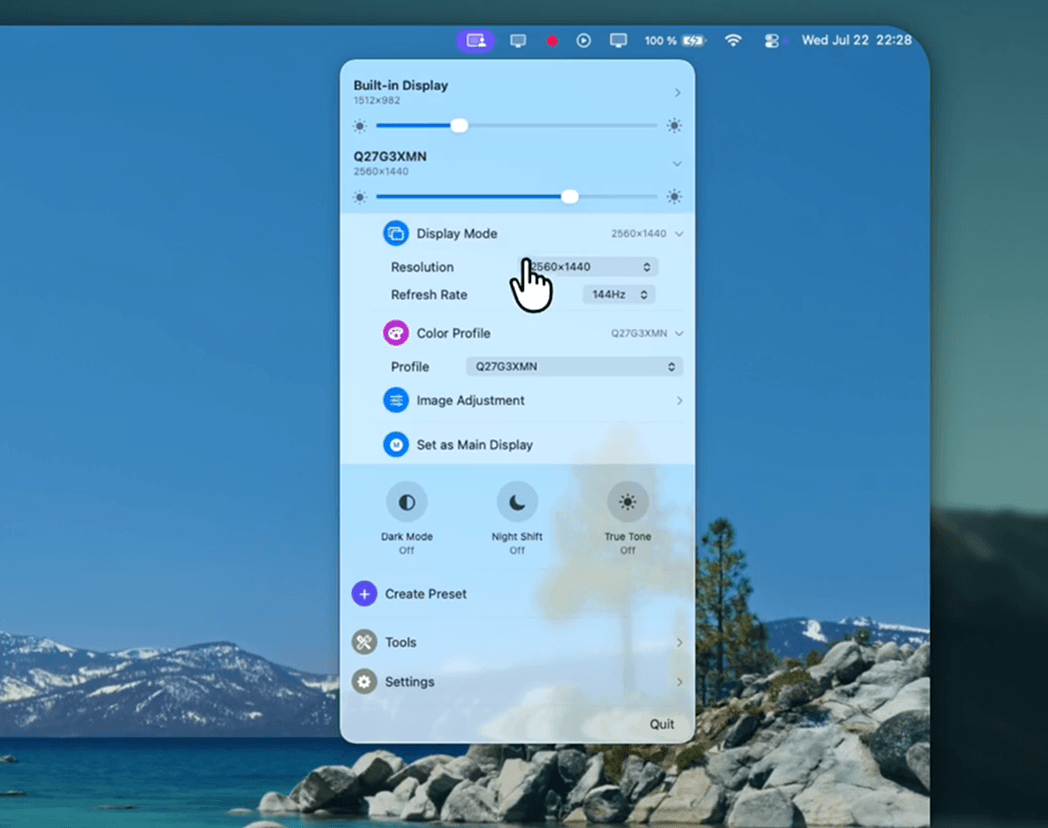
Crisp is a native macOS menu bar app for managing external displays. It is a free, open-source alternative to BetterDisplay and Lunar, offering all the core display management features at zero cost.
Features
- HiDPI on any display: Enable Retina-style scaled resolutions on external monitors, including automatic HiDPI setup for 2K+ displays.
- Brightness everywhere: Hardware DDC control for external monitors with software (gamma) fallback, smooth fades, brightness-key routing to the display under the cursor, and true darkness below the hardware floor.
- Presets: Save named display configurations (resolution, brightness, arrangement) with custom icons and colors, apply with one click, update in place.
- Display arrangement: Drag-to-arrange canvas, main display switching.
- Screen effects: Dark Mode (with the system's animated transition), Night Shift, True Tone.
- Color: ICC profile switching, gamma/contrast/gain image adjustment.
- Virtual displays: Create HiDPI virtual screens.
- Extras: Combined brightness slider, auto brightness following the built-in display, notch hiding, launch at login.
Install
brew install --cask didriksg/tap/crisp
Or grab Crisp.dmg from the latest release and drag Crisp to Applications.
Requirements
- macOS 15 (Sequoia) or later
Permissions
- Accessibility: Needed only for routing the keyboard brightness keys to the display under the cursor.
- Administrator password (one time, per monitor): Required the first time you enable HiDPI for a display, as Crisp installs a display override file into
/Library/Displays/Contents/Resources/Overrides.
License
MIT